Any document — PDFs, scans, Office files, images and handwriting — becomes structured data your AI can actually answer from.
Free to try with your own file. Results in minutes.
Accuracy = the share of questions a downstream LLM (GPT-5.4-mini or Gemini 3 Flash) answers correctly from Nebula's converted output, matching how a human reads the original document. Full methodology report coming soon.
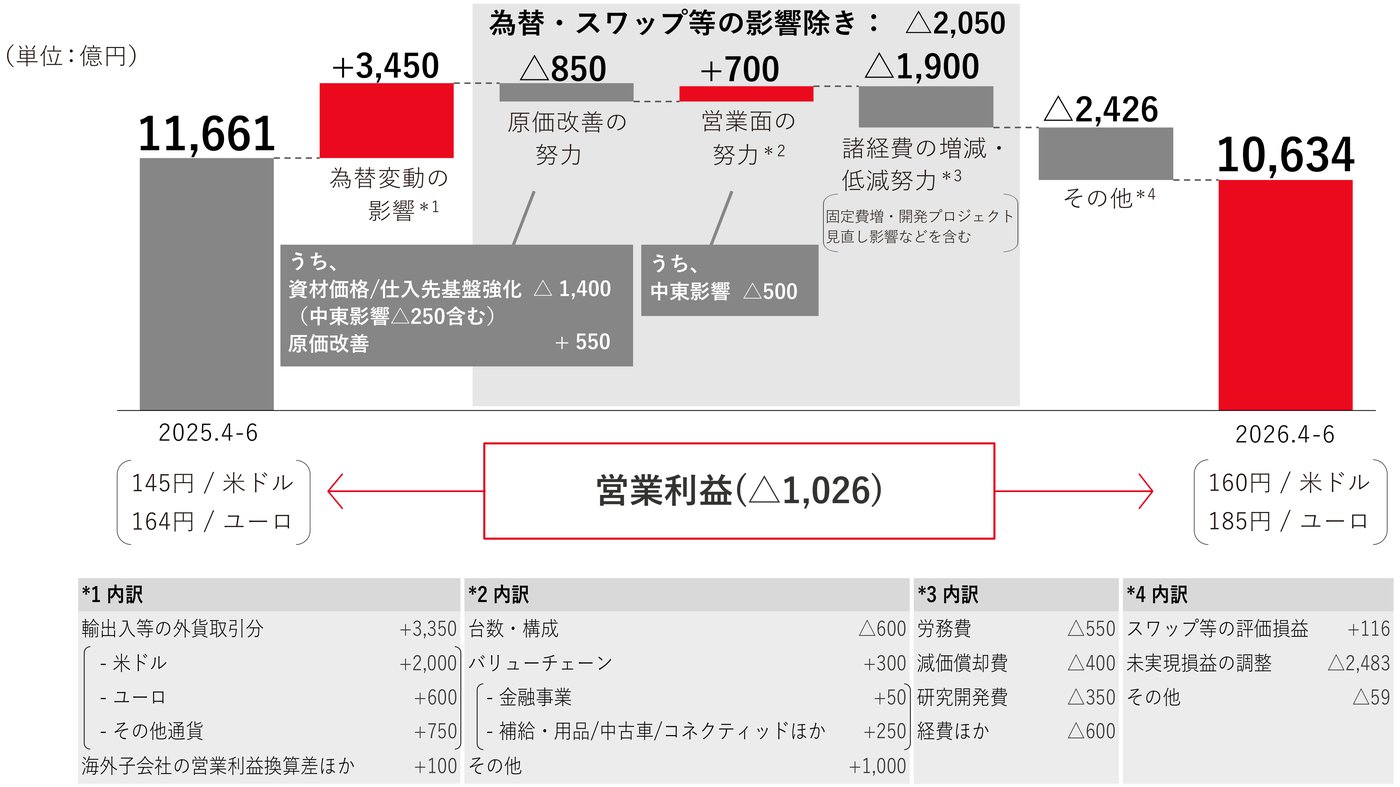
Source: 上場企業の決算説明資料(2026年8月)p.7
Tap a highlighted line to see where it came from on the source page.
# 連結営業利益増減要因 (単位:億円) | 順序 | 項目 | 増減 | 表示営業利益 | 注記 ||---:|---|---:|---:|---| | | ||---|---:| | | ||---|---:| | | ||---|---:| | | ||---|---:|
Ask an AIWhich factor pulled profit down the most?
A profit bridge (waterfall) chart from an earnings presentation. Nebula turns each step into an ordered table row, keeps the footnoted breakdowns, and carries the units.
See the full gallery in NebulaLooks right is not the same as your AI can use it.
Most text extraction optimizes for clean-looking text. But a perfectly transcribed table that loses its rows and columns is unanswerable. Nebula optimizes for the metric that matters: whether a downstream model can answer a question correctly from the result, just as a human would from the original.
Segment Cloud 12 19 27 41 Services 8 9 11 14
(rows and columns flattened)
Ask "Cloud revenue in FY24?" and the model has to guess: the answer (27) is buried in a flat run of numbers.
| Segment  | FY22 | FY23 | FY24 | FY25 |
| -------- | ---: | ---: | ---: | ---: |
| Cloud    |   12 |   19 |   27 |   41 |
| Services |    8 |    9 |   11 |   14 |
Ask the same question and a downstream LLM answers correctly: FY24 Cloud = 27.
Accuracy = the share of questions a downstream LLM (GPT-5.4-mini or Gemini 3 Flash) answers correctly from Nebula's converted output, matching how a human reads the original. Full methodology report coming soon.
Charts to Chart.js JSON. Tables that keep their shape.
The structure that makes a document useful survives the parse, so your AI gets data instead of flattened text.
Charts become data
Bar, line, and pie charts are transcribed into structured Chart.js JSON: labels, series, values, and axis units. Numbers stay numbers.
Tables keep structure
Rows, columns, merged cells, and financial-statement hierarchy survive the parse, with footnotes preserved instead of dropped.
Use the platform, connect the API, work from your AI assistant, or deploy your own model.
Choose the path that matches your workflow: a web platform for teams, an API for pipelines, a connection for AI assistants such as Claude and ChatGPT, or a private fine-tuned deployment for enterprise AI workloads.
Nebula app
Sign in, drag in a PDF, an image deck, or a whole folder, watch pages process, and download chart-aware Markdown and JSON. No code required.
- Upload and go, no setup
- Batch and folder uploads
- Download Markdown or JSON
Nebula API
Async REST with presigned uploads, batch and folder jobs, and Markdown or JSON output for your RAG and agent pipelines.
- Async REST, presigned uploads
- Batch and folder jobs
- Markdown, JSON, or both
POST /v1/jobs
{
  "model_id": "nebula",
  "options": { "response_format": "both" }
}Nebula in your AI assistant
Add Nebula to Claude, ChatGPT, Claude Code, Codex and other MCP-compatible assistants, then ask in plain words: "Convert this PDF to markdown with Nebula."
- Open to every Nebula account (Beta)
- Sign in with your Nebula account, or use an API key
- Attachments, links and files on your computer
Local fine-tuned deployment
Deploy a private model in your environment for sensitive, repeatable enterprise workloads that should run on systems you own.
- Scoped to your architecture
- Fine-tuned on your document domain
- Designed for on-premises or private environments
Beyond the API: own and tune the models behind your AI.
For enterprises standardizing on AI, Nebula is also how you provision, route, and fine-tune the models underneath. This is the third way to adopt Nebula, beyond the web platform and API.
Model routing
Route each task to the best frontier or fine-tuned model through a single integration point, with no vendor lock-in.
Local & private LLM provisioning
Provision private, locally-deployed LLMs inside your environment for sensitive workloads, scoped to your architecture.
Domain fine-tuning
Fine-tune models on your own documents and domain, so everyday workflows run on systems you own and control.
Evaluation & integration harnesses
Wire models into your systems and keep quality measurable with evaluation harnesses built around answerability.
Deployment model, SLAs, and latency are scoped per customer architecture and commercial terms.
The right model for every document, with enterprise controls.
Nebula routes to leading frontier vision-language models plus our own fine-tuned VLMs, choosing the best for each document. Documents are processed through enterprise model providers under their enterprise terms, kept isolated per tenant, and never used to train models.
- Per-tenant data isolation
- Per-customer API-key authentication
- Per-job audit trail
- Documents are not used to train models
- Processed via enterprise model providers under their enterprise terms
ISO 27001:2022 certified, SOC 2 Type 2 examined, and GDPR compliant.
One layer for many document workflows.
Use Nebula wherever business knowledge needs to move from visual documents into AI systems: RAG, agents, analytics, and downstream LLM pipelines.
Japanese financial documents
Annual reports, governance materials, IR releases, and disclosure filings become structured AI inputs without losing Japanese layout.
Statements & invoices
Issuer-specific statement and back-office layouts become normalized line items for accounting and reconciliation agents.
Board decks & presentations
Slide structure, narrative, tables, and chart series are extracted from PowerPoint exports without flattening the visual context.
Data rooms & RAG ingestion
Large enterprise PDF estates are prepared for retrieval, summarization, diligence, and agentic workflows.
Legal & regulatory corpora
Long Japanese legal PDFs are ingested with footnotes and citations preserved in reading order.
Construction, logistics, retail
Inspection sheets, registries, delivery notes, and forms are structured consistently across industries.
Frequently asked questions about Nebula.
What Nebula is, how it processes documents, where the data lives, and how to integrate.
Give your AI documents it can answer from.
Upload a document and get chart-aware Markdown plus structured JSON in minutes, or call the API from your pipeline.